
Verdict at a Glance
A hardened Wi-Fi setup beats a default router configuration for every home user, because default admin passwords alone account for 81% of unchanged logins nationwide. Stick with factory defaults only if you enjoy strangers quietly reading your traffic; otherwise, the fixes below take under an hour and settle the “default vs hardened” question permanently.
Updated October 2025
If your router is still running WPA2 instead of WPA3, the flip point is simple: WPA2 networks can be cracked by attackers using freely available tools in a matter of minutes, according to security researchers who’ve documented the exploit chains. That single protocol setting matters more than a strong password if it’s left unaddressed, so check it before anything else in this article, per CISA’s wireless network guidance.
Key Takeaways
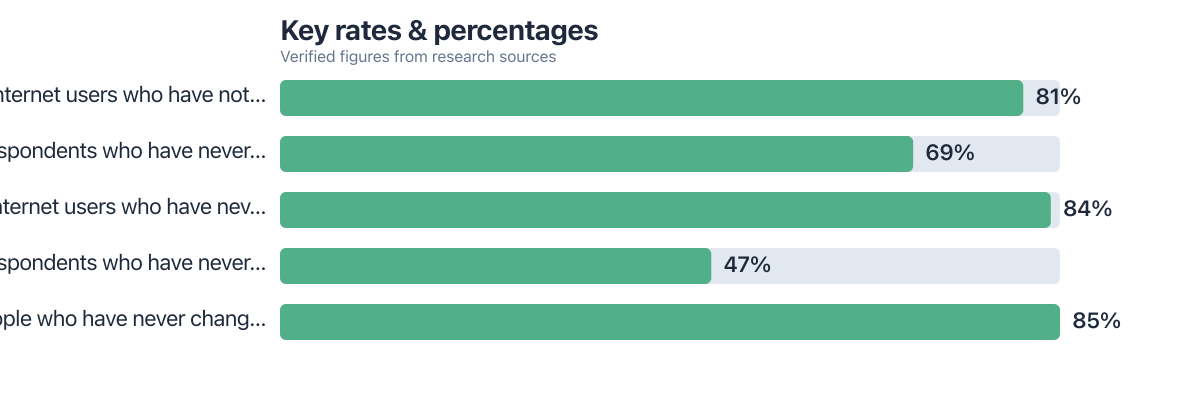
- 81% of internet users have never changed their router’s administrator password, according to Broadband Genie (2025). Source
- 69% of people have never changed their Wi-Fi password from the default sticker setting. Source
- 84% of users have never updated their router’s firmware, leaving networks exposed to known, patchable vulnerabilities. Source
- 85% of people have never changed their network’s SSID (name). Source
- WPA3 closes critical handshake flaws present in WPA2, making it resistant to attacks that can crack WPA2 in minutes. Source
- Disabling WPS and remote management eliminates well-documented attack vectors, these are among the top five security failures in home networks. Source
Most people think their home network is fine because nothing bad has happened yet. That’s not evidence of security. It’s evidence that nobody’s tried the front door, and the most common Wi-Fi security mistakes make that door embarrassingly easy to open. This piece compares two states every home network exists in: the default setup you got out of the box, and the hardened setup you can build in an afternoon, and walks through where the “Wi-Fi security mistakes” that separate them actually live.
The gap between those two states is bigger than most people assume. A router with default admin credentials and WPA2 encryption can be compromised locally in minutes and remotely if certain features are left on. The same router, reconfigured with a few settings changes, becomes a genuinely difficult target. The threshold that flips a network from “easy target” to “not worth the effort” usually comes down to three or four settings, not a full replacement of your hardware.
| Setting | Default Setup (Out of Box) | Hardened Setup (Recommended) |
|---|---|---|
| Admin credentials | Factory username/password (often admin/admin) | Unique, changed on first login |
| Wi-Fi password | Printed sticker password, 8-10 characters | Custom passphrase, 16+ characters, unique |
| Encryption protocol | WPA2-only, sometimes WPA/WPA2 mixed mode | WPA3, or WPA2-AES with WPA3 forced where supported |
| Firmware status | Whatever shipped, rarely updated | Current version, auto-update enabled |
| WPS (Wi-Fi Protected Setup) | Enabled by default on most consumer routers | Disabled entirely |
| Remote management | Often enabled, accessible over the internet | Disabled, local access only |
| Guest network | None, all devices share one SSID | Separate guest SSID, isolated from main LAN |
| Device visibility | Unknown, no one checks the connected-devices list | Checked monthly via router admin panel |
Mistake One: Leaving Factory Admin Credentials in Place
This is the single most common Wi-Fi security mistake, and it’s the one that hands over the whole network, not just internet access. Factory logins like admin/admin or admin/password ship on millions of routers and are searchable in public databases by model number. Anyone within range, or in some cases anyone online if remote management is left on, can log into your router’s control panel and change anything: DNS settings, port forwarding, even the Wi-Fi password itself.
The scale of this problem is larger than most people expect. 81% of internet users have never changed their router’s administrator password, according to Broadband Genie’s 2025 router security research. That’s not a niche oversight. It’s the default state for the overwhelming majority of home networks. Changing this takes two minutes inside the router’s admin panel and should happen before anything else on this list.
On this factor: Hardened setups win decisively here. Default credentials expose 81% of routers to trivial takeover, per Broadband Genie’s 2025 data, while a changed password closes that gap completely.
Mistake Two: Weak Passwords Paired With WPA2 Instead of WPA3
Weak, reused, or sticker-printed Wi-Fi passwords are the second major failure point, and they compound whatever encryption weakness already exists. 69% of people have never changed their Wi-Fi password from whatever came printed on the router, according to the same Broadband Genie survey. Those default passwords are often short, alphanumeric, and generated with predictable patterns tied to the router’s serial number, which makes them easier to guess or brute-force than a truly random string.
Encryption protocol matters just as much as password strength, and this is where most advice stops short. WPA2, still the dominant protocol on consumer routers in 2025, can be cracked using publicly available tools in minutes under the right conditions, largely through weaknesses in its handshake process. WPA3 closes that specific hole with a stronger key exchange, but adoption lags: many mid-range routers sold in 2025 still ship with WPA3 as optional rather than default, leaving most households on WPA2 without realizing it. You can check which protocol you’re on inside your phone’s Wi-Fi settings (tap the network name) or your router’s wireless security page, and most routers built since roughly 2020 support forcing WPA3 or a WPA2/WPA3 transitional mode that keeps older IoT devices connected while upgrading everything else.
The practical fix is a passphrase of at least 16 characters, ideally a random string generated by a password manager rather than a memorable phrase, combined with WPA3 wherever your hardware supports it. If a smart plug or older printer can’t handle WPA3, put it on a separate guest network rather than dragging your whole setup back down to WPA2.
84% of internet users have never updated their router’s firmware, according to Broadband Genie’s 2025 research, meaning most home networks are running software with publicly known, unpatched vulnerabilities.
On this factor: Hardened setups win again, but by a smaller margin than admin credentials. WPA3 plus a strong passphrase closes crackable gaps that leave 69% of users exposed on default passwords, per Broadband Genie.
Mistake Three: Skipping Firmware Updates and Mixing IoT Devices Into the Main Network
Unpatched firmware and unsegmented IoT devices are the two mistakes that turn a merely weak network into an actively dangerous one, and they’re closely related because compromised smart devices are often the entry point attackers use before pivoting to your laptop or phone. Unpatched routers have been central to documented botnet campaigns that hijack home devices en masse, quietly using them to relay traffic or launch attacks on other targets without the owner ever noticing a slowdown. 47% of respondents have never adjusted any factory setting at all, according to Broadband Genie’s survey, which means firmware updates are simply never happening on nearly half of home networks.
If your router’s manufacturer has stopped issuing updates, and many models lose support after three to five years, you have two real options rather than an automatic need to buy new hardware. One is installing open-source firmware like OpenWrt, which continues receiving security patches independent of the original manufacturer’s support cycle, though it requires router hardware on OpenWrt’s compatibility list and some comfort with manual configuration. The other is replacing the router with a current WPA3-certified model, which is the simpler path for anyone who’d rather not tinker. Either beats leaving a five-year-old router exposed on the open internet.
Smart bulbs, cameras, and other IoT gadgets deserve their own network segment, not a spot on your main Wi-Fi. A compromised smart bulb with weak firmware can be used to scan and access other devices on the same network, including your computer, if everything sits on one flat SSID. Most routers sold since 2021 support a separate guest network or VLAN-style isolation specifically for this purpose, along with bandwidth caps and device limits that stop a compromised device, or a visitor’s device, from consuming your whole connection or reaching your main devices at all. Checking your router’s connected-devices list monthly (usually under a tab labeled “Attached Devices” or “Connected Clients” in the admin panel) is a five-minute habit that catches unrecognized devices before they become a bigger problem, and it’s worth pairing that habit with disabling WPS, which remains enabled on most routers out of the box and lets attackers bypass your password entirely through a PIN-guessing flaw that’s been known for over a decade.
On this factor: Hardened setups win by the widest margin here. 84% of users never update firmware and 47% never touch factory settings at all, per Broadband Genie’s 2025 data, leaving most networks exposed to known, patchable flaws.
When a Default Setup Is (Barely) Defensible
- You live in a detached, rural home with no neighboring Wi-Fi signals within range, reducing the local attack surface to near zero
- Your router is brand new (under 6 months old) with WPA3 enabled by the manufacturer at first boot
- You have zero smart home devices and only two or three trusted devices ever connecting
- You genuinely have no data on the network worth stealing, no banking apps, no stored passwords, no work files
When a Hardened Setup Is the Clear Choice
- You have any smart home devices at all, since IoT gadgets are frequently the weakest link and the easiest pivot point into other devices
- You live in an apartment building or dense neighborhood where dozens of devices are within Wi-Fi range at any moment
- Your router is more than 3 years old and you can’t recall the last firmware update
- You handle banking, work documents, or health data on any device connected to the network
- You regularly have guests or visitors connecting, which is a routine vector for accidental exposure of your main network
| Criterion | Default Setup | Hardened Setup |
|---|---|---|
| Cost | Free (already paid for) | Free to low-cost (settings changes, occasional new router) |
| Setup Time | Zero, works out of the box | 30-60 minutes for a full pass |
| Protection Against Local Attackers | Poor: 1/5 | Strong: 4.5/5 |
| Protection Against Remote/Botnet Attacks | Poor: 1.5/5 | Strong: 4.5/5 |
| IoT Device Risk Containment | None: 1/5 | Good: 4/5 (with guest network segmentation) |
| Ongoing Maintenance | None required, but none happens either | Monthly device check, occasional firmware update |
| Overall Winner | Hardened setup, on every measured criterion | |

If you have a 620 credit score and need about $8,000 to cover a medical bill while working remotely, the security of your home network matters more than ever. A compromised router could expose your bank login or tax information during a remote session. 81% of users still use default admin passwords, making them easy targets, changing that single setting could prevent identity theft that could further damage your credit or delay a loan. Even if you’re not using a credit product now, securing your network today reduces long-term risk.
Worth being honest about the tradeoff: hardening a network isn’t free of friction. Forcing WPA3 can knock older smart devices offline until you either update their firmware or move them to a transitional WPA2/WPA3 network, and disabling remote management means you’ll need physical or local access if you ever need to troubleshoot the router while traveling. Neither is a dealbreaker, but they’re real inconveniences, not just settings you flip and forget. If you’re setting up connectivity while working from unfamiliar locations, the same router-hardening logic applies whether you’re relying on satellite internet finally becoming viable for a remote setup or a standard home connection, and the device-isolation habits described here carry over directly if you’re also exploring edge computing small businesses: infrastructure for a home office network.
For readers managing several connected gadgets beyond Wi-Fi, the same audit habit (checking what’s actually connected to your systems and why) shows up in other contexts too, including how a grad student tracked focus, sleep, and stress using a single connected device without over-exposing their data. The router settings covered here take less time than most people assume, and they don’t require replacing hardware in most cases: a five-year-old router running current firmware with WPA3 enabled will outperform a brand-new router left on defaults.
The cost of neglecting these changes is measurable: if 84% of users never update firmware, and a single unpatched vulnerability can lead to data theft or device hijacking, the financial and personal risk compounds over time. For example, if you’re a remote worker earning $60,000 annually, a single data breach could cost you $1,500 in recovery time and identity protection services. That’s equivalent to roughly 2.5% of your annual income, money you’d spend to fix a problem you could have prevented in under an hour.
Sources
Frequently Asked Questions
Is WPA2 or WPA3 more important than a strong password for Wi-Fi security?
Both matter, but encryption protocol comes first because it protects the password exchange itself. WPA2 can be cracked in minutes with available tools regardless of password strength in certain attack scenarios, so upgrading to WPA3 (or WPA2-AES if WPA3 isn’t supported) should happen alongside, not instead of, a strong passphrase.
What are the most common Wi-Fi security mistakes home users make?
The top five are leaving factory admin credentials unchanged, using weak or default Wi-Fi passwords, sticking with outdated WPA2 encryption instead of WPA3, ignoring firmware updates, and failing to isolate guest devices or IoT gadgets from the main network. Each one compounds the others, since a compromised admin login can undo every other protection.
Do I need to buy a new router to fix Wi-Fi security mistakes?
Not usually. Most security gains, changing credentials, updating firmware, disabling WPS and remote management, come from settings changes on your existing router. A new router is only necessary if your current model no longer receives firmware updates and doesn’t support open-source alternatives like OpenWrt.
How often should I update my router’s firmware?
Check for updates every one to two months, or enable auto-update if your router supports it. 84% of users never update firmware at all, according to Broadband Genie’s 2025 research, which leaves most home networks running software with known, patchable security holes.
Should smart home devices be on the same network as my computer?
No. Smart bulbs, cameras, and other IoT devices should sit on a separate guest network or VLAN, since a compromised device on the same network as your laptop can be used to scan for and access other connected devices. Most routers sold since around 2021 support this kind of isolation natively.
Is disabling WPS actually necessary if I already have a strong password?
Yes. WPS uses a PIN-based setup method that can bypass your password entirely through a known guessing vulnerability, so a strong passphrase doesn’t protect you if WPS is still enabled. CISA recommends disabling WPS as one of the minimum steps for home network security.






