
Quick Answer
Task automation apps like n8n, Huginn, and Automate can replace paid CRMs for daily tasks. Self-hosting n8n on a $5/month VPS runs unlimited workflows, saving over $180 annually versus HubSpot Starter. Android users can automate with 100% free tools like Tasker, avoiding cloud dependency.
Updated December 2025
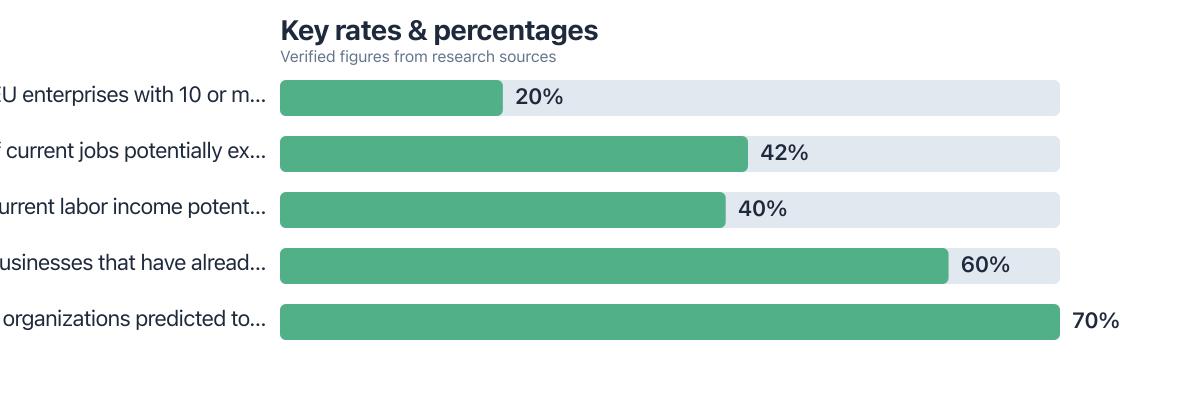
Task automation apps let individuals and small teams manage daily workflows without paying for full CRM systems. These tools handle email follow-ups, calendar syncs, file organization, and reminders, jobs that enterprise CRMs also do, usually at a markup. 60% of businesses have implemented automation solutions, yet many overpay for unused features, according to Duke University (via Vena Solutions). The average paid CRM charges $15–$99 per user per month. Free or self-hosted task automation apps can deliver similar results for a fraction of that. Eurostat data shows that 20.0% of EU enterprises with 10+ employees used AI in 2025, which tells you automation adoption has moved well past traditional CRM dashboards (Eurostat).
Stick to lightweight, modular tools and you sidestep vendor lock-in while keeping full control over your own data. This guide walks through setting up email, calendar, file, and mobile automations using no-code or open-source platforms, no full CRM subscription needed. You’ll get specific setup steps, real cost comparisons, and an honest look at the privacy trade-offs, based on 2025 data.
Key Takeaways
- Self-hosting n8n on a $5/month VPS enables unlimited workflows, saving over $180 annually compared to HubSpot Starter’s $15/user/month fee (Source: Vena Solutions, 2025).
- Android users can automate with 100% free apps like Tasker, bypassing cloud dependency and avoiding CRM data sharing (Source: Google Play, 2025).
- According to Eurostat, 20.0% of EU enterprises with 10+ employees used AI in 2025, showing broader adoption of automation tools beyond just CRMs (Source: Eurostat, 2025).
- Free platforms like Huginn and Activepieces support 200+ integrations without per-action fees, matching or exceeding basic CRM connectivity (Source: Huginn GitHub, 2025).
- Automated file sorting and note-taking can save over 500 hours annually in finance departments, demonstrating the real productivity lift (Source: American Express, via Vena Solutions, 2025).
In This Guide
- Why Skip the Full CRM for Daily Automation?
- Which Free Task Automation Apps Work Best?
- How to Automate Email and Calendar Tasks
- Automating File Organization and Note-Taking
- Mobile-First Task Triggers for Android Users
- Self-Hosting for Privacy and Cost Control
- Scaling Beyond Basics Without a Paid CRM
Why Skip the Full CRM for Daily Automation?
Email follow-ups, calendar syncs, file sorting: none of that needs a full CRM behind it. HubSpot Starter and Pipedrive charge $15–$99 per user per month for feature sets most individuals barely touch. In 2025, 60% of businesses adopted automation, yet a lot of them are still paying for enterprise functions that sit unused, according to data from Duke University accessed via Vena Solutions. Eurostat’s finding that 20.0% of EU enterprises used AI in 2025 backs this up too: automation has spread well beyond companies running full CRM suites.
These platforms also tend to lock you into their ecosystem. Per-user fees add up fast once a team grows past two or three people. Even the free tiers usually require an account and some data sharing on their terms. For a solo operator or a personal workflow, that’s a lot of overhead for very little payoff.
Self-hosting n8n on a $5/month VPS supports unlimited workflows, saving over $180 annually versus a $15/user/month CRM.
Which Free Task Automation Apps Work Best?
n8n, Activepieces, and Huginn are free and open-source, with no per-action billing hiding in the fine print. Between them they cover 200+ integrations and can run locally or on a self-hosted server. Zapier, by contrast, tacks on charges once your API calls or workflow complexity climb past its free limits.
If you’re on Android, Automate and Tasker handle device-level automation without ever touching the cloud. Both cost nothing, even once your rules get fairly elaborate.
Start with n8n’s free cloud tier. Once you understand the interface, migrate to a $5/month VPS for full control, no monthly fees for unlimited workflows.
| Tool | Cost | Workflow Limits | Data Ownership | Best For |
|---|---|---|---|---|
| n8n (self-hosted) | $5/month VPS | Unlimited | Full; all data stays on your server | Privacy-focused users and teams wanting no per‑step fees |
| n8n (cloud free tier) | $0 | 5 active workflows | Metadata stored on n8n cloud; potential sharing | Beginners testing automation before self-hosting |
| Huginn (self-hosted) | $0 (self-hosted) | Unlimited | Full; open-source agent framework | Developers comfortable with configuration files |
| Tasker (Android) | $0 | Unlimited | Full; runs entirely on device | Android users automating device-level triggers offline |
| HubSpot Starter CRM | $15/user/month | Unlimited CRM features | Vendor-managed; limited export options | Sales teams needing built-in reporting and collaboration |
How to Automate Email and Calendar Tasks
Set Up Gmail and Calendar Syncs
n8n and Activepieces can sync Gmail to Google Calendar without you touching either app directly. Build a workflow that turns an incoming email into a calendar event whenever it spots a keyword like “meeting” or “follow-up.” Manual entry disappears.
Gmail filters combined with a short script can auto-reply to routine messages too. Say a client emails the word “invoice” or “schedule,” that triggers a canned response instantly. None of this costs anything per email sent.
Extract Notes and Attachments
n8n can pull attachments straight out of emails and drop them into a folder you designate. Add a rename rule so each file picks up the sender’s name and the date automatically. Clutter drops, and finding things later gets a lot easier.
Wire this into Notion or Obsidian with a free API key and your meeting notes will land in your knowledge base right after the call ends.
Automating File Organization and Note-Taking
Sort Downloads with Rules
Point Huginn or Node-RED at your Downloads folder and let it watch. PDFs go to “Legal.” A .jpg gets renamed and shipped to “Photos.” These rules fire on a schedule, or the moment a new file shows up.
Backups to Dropbox or a local drive can run the same way, through simple scripts, with no paid storage add-on required.
Link Notes to Tasks
Connect Obsidian or Notion to n8n and have a new note spin up the instant a calendar event ends. Tag it “action” or “review” automatically. Now your daily tasks feed straight into your knowledge base without you lifting a finger.
The Notion community publishes free templates for daily capture workflows too. No subscription needed to use them.
Mobile-First Task Triggers for Android Users
Android users don’t need a desktop in the loop at all. Automate and Tasker run as one-time purchases or entirely free, and you can set rules as specific as: “When battery drops below 20%, back up photos to cloud.”
Location triggers work well too: “When I arrive at the office, turn on Wi-Fi and open Outlook.” All of this runs locally, no cloud sync required, so your data stays put.
iOS is more restrictive here. You can work around it with webhooks through a browser extension, or by leaning on n8n’s mobile-friendly API, but Android still wins for full offline automation.
Tasker’s free version allows unlimited rule creation. Paid add-ons exist, but the core automation engine is 100% free for Android users.
Self-Hosting for Privacy and Cost Control
Running n8n or Automatisch on a $3-$5/month VPS means your emails, files, and workflows never leave a server you control. For anyone handling sensitive personal or client information, that matters more than most people realize until something goes wrong.
Run the numbers: HubSpot Starter runs $15 a month per user, which is $180 a year. A $5/month VPS gets you unlimited workflows for a flat rate instead, over $175 saved annually, and that gap only grows as your team does.
Upkeep is lighter than people expect. Most self-hosters update their server once every three to six months, and free guides cover the whole process even if you’ve never touched a terminal before.
Scaling Beyond Basics Without a Paid CRM
Build Multi-Step Workflows
Chain n8n, Huginn, and Tasker together and you get a real pipeline: a new email triggers an auto-reply, which creates a calendar event, which kicks off a file backup, which generates a note in Obsidian.
That’s a CRM lead pipeline in everything but name, minus the per-user fees. Free models like Llama 3 running through a local API can even route messages or score leads based on keyword matches.
Know When to Upgrade
Self-hosting covers roughly 80% of daily tasks without complaint. Once you need team collaboration, reporting dashboards, or a client-facing portal, a lightweight paid tool starts to earn its keep. ClickUp or Trello’s paid tiers run under $10/month and are worth a look once you’re at that stage.
Most people never actually need a full CRM. The savings show up mostly from skipping vendor lock-in and no longer paying for features that sit dormant.
There are exceptions, though. Skip the automation-first approach if you’re bound by regulations like HIPAA, need real-time collaboration with audit trails, or run a customer-facing portal. Self-hosted tools are great for personal productivity, but they don’t come with compliance certifications, granular access controls, or a support line, things a full CRM is built around. Sharing a pipeline with a team and tracking every change someone makes calls for a dedicated CRM, plain and simple. And while VPS maintenance isn’t hard, someone who’s never opened a command line might find the first setup rough going, in which case the free cloud tiers from n8n or Activepieces make for a gentler start, even with the modest data trade-offs that come attached.
Frequently Asked Questions
Can you automate daily tasks without any coding?
Yes. n8n, Activepieces, and Tasker offer visual workflow builders. No code required to set up email syncs, file sorting, or calendar triggers.
How long does initial setup take for a beginner?
Setting up five basic tasks, things like email filtering, calendar sync, file backup, note creation, and mobile triggers, takes about 2-3 hours if you’re following free tutorials. Most people wrap it up in under four hours total.
Is Android better than iOS for automation?
Yes. Android apps like Tasker and Automate allow full device-level automation without cloud dependency. iOS restricts background tasks and limits access to system functions.
Do free automation apps collect my data?
Self-hosted tools like n8n or Huginn keep everything on your own server. Cloud-based free tiers, n8n’s included, may store some metadata on their end, so check the privacy policy before you sign up for anything.
Can you replicate a CRM lead scoring system with free tools?
Yes. Use n8n to track email responses, meeting attendance, and file downloads. Assign points based on actions. When a lead hits 50 points, trigger a follow-up. This mimics basic CRM scoring.
What’s the cost of running n8n on a VPS?
A $5/month VPS from providers like DigitalOcean or Linode runs n8n with unlimited workflows. This saves over $180 annually compared to a $15/user/month CRM.
Are there privacy risks with self-hosting?
Self-hosting cuts down on third-party exposure, but the security burden shifts to you. Strong passwords, 2FA turned on, and regular software updates aren’t optional here.
Sources

How a Micro-Agency Owner Built a Repeatable Sales Pipeline Using Only Free CRM Apps shows how to replicate CRM functions without cost. A solo developer used AI code assistants to build automation scripts. A solo content creator tested four scheduling apps before finding one that stuck. A grad student tracked focus, sleep, and stress with one $80 gadget. These cases show how small tools can replace large systems.






