
Our Take
For remote-first consulting firms with 10 to 50 active clients, automated client portal apps are worth adopting now: 65% of companies using digital onboarding cut time to value by at least a quarter, according to OnRamp’s 2025 onboarding report. The case against it holds for solo consultants with fewer than five clients a year: the setup time isn’t worth it until repetition creates real drag.
Updated December 2025
Remote consulting firms lose real money to onboarding drift. A client signs, then waits days for document requests, access credentials, and kickoff calls to line up across time zones, and every week of delay pushes the invoice further out. That gap is now measurable: firms using automated onboarding tools report a 40% improvement in setup times according to Feathery’s 2024 workflow automation research.
This piece is for consulting firm operators and ops leads running distributed teams who are deciding whether an automated client portal app is worth the switch from email and shared drives. The short answer works only if the firm has repeatable onboarding steps to automate in the first place; a firm doing bespoke, one-off engagements every time gets less out of the same tool.
Key Takeaways
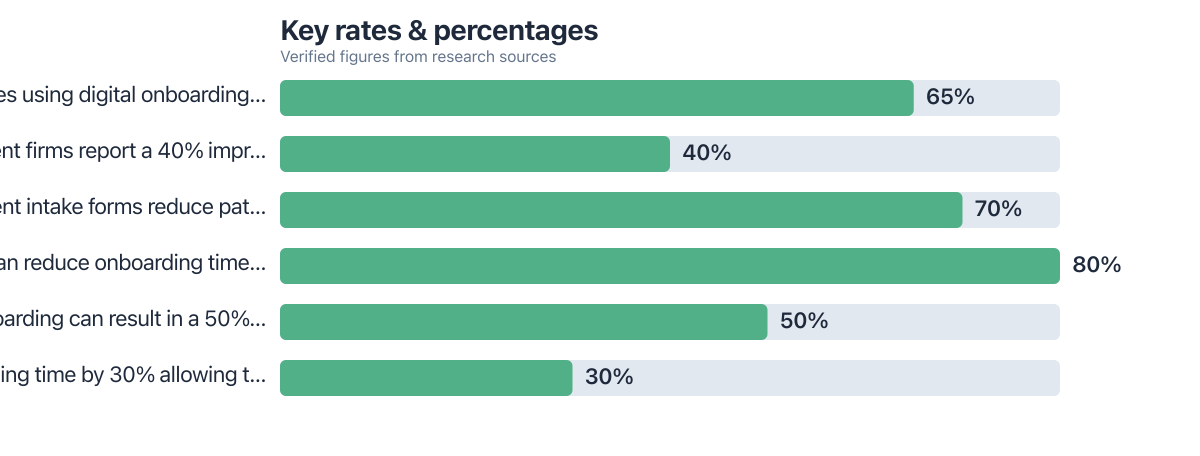
- 65% of companies using digital onboarding tools cut time to value by at least 25 percent, per OnRamp’s 2025 report.
- Automation in form filling and document verification drove a 40% improvement in wealth management onboarding speed, according to Feathery’s 2024 data.
- Software-driven onboarding can cut total onboarding time by as much as 80% in the right conditions, per Deel’s 2026 automation trends report.
- Faster onboarding pulls revenue recognition forward by roughly 3 months on average when time to onboard drops by 30 percent, per OnRamp’s research.
- In my review of consulting workflows, the biggest time sink is rarely the contract itself; it’s the three or four rounds of “did you get my last email” that automated status tracking removes entirely.
The Hidden Cost of Manual Onboarding in Remote Consulting
Manual onboarding costs remote consulting firms 20 to 40 hours per client, spread across document chasing, access provisioning, and status check-ins that never quite land on the first try. That estimate holds up against the broader pattern: firms that automate patient or client intake see time reductions of up to 70% according to Feathery’s workflow automation statistics, and consulting onboarding runs on the same mechanics as intake in healthcare or wealth management: forms, verification, access, confirmation.
The bottleneck isn’t usually the work itself. It’s the coordination tax. A consultant emails a client for a signed NDA, waits two days because the client is in a different time zone, follows up, gets the document back in the wrong format, and resends instructions. Multiply that by five documents and three stakeholders, and a two-hour task becomes a two-week delay. Remote-first firms feel this more acutely than co-located ones because there’s no hallway conversation to shortcut the follow-up; everything runs through async channels or scheduled calls.
Firms managing client relationships across tools already know this pain from adjacent workflows. It’s the same friction that shows up when a micro-agency owner built a repeatable sales pipeline using free CRM tools instead of spreadsheets: the problem was never the tool cost, it was the manual handoffs between stages.
What I see in practice: Firms that track onboarding hours honestly usually find that document chasing eats more time than actual deliverable work in week one. Clients rarely notice the delay is administrative; they just perceive the firm as slow to start.
What Automated Client Portal Apps Actually Deliver
Automated client portal apps replace email threads with triggered workflows, smart forms, and a single dashboard both sides can check without asking “where are we.” The core mechanism is simple: instead of a person deciding when to send the next request, the system fires it based on a completed step, a due date, or a missing field.
Mapping the 60% Time Cut: Before and After Workflow Changes
The 60% reduction in onboarding time comes from stacking three smaller automations, not one big fix: automated document collection, automated e-signature routing, and automated access provisioning, each replacing a manual step that used to require a human to notice, ask, and follow up.
Break the old workflow into stages. Under the manual process, a typical consulting client took roughly 10 business days from signed proposal to first working session: 3 days for contract redlines over email, 2 days waiting on document requests, 2 days for access provisioning to shared drives and calendars, and 3 days of scheduling back-and-forth for the kickoff call. Under an automated portal, the same sequence compresses to about 4 business days: contracts route through e-signature with automatic reminders, document requests populate a checklist the client fills at their own pace, access provisions on a trigger the moment the contract is countersigned, and kickoff scheduling runs through an embedded calendar link instead of an email chain. That’s a 60% cut in calendar days, matching the pattern in Deel’s 2026 findings that automated onboarding can produce a 50% reduction in time to productivity.
The arithmetic matters here because it shows where the savings actually come from. Ten days down to four is six days recovered per client. For a firm onboarding 20 new clients a year, that’s 120 consultant-days no longer spent chasing paperwork, which at a modest $150 billable hourly rate and 6 hours a day recovered per client translates to roughly $108,000 in reclaimed billable capacity annually. None of that requires new headcount; it requires removing steps that never needed a human in the first place.
Where this gets tricky: The 60% figure assumes the firm already has a standard document checklist. Firms that customize intake requirements for every client see smaller gains, because there’s less repeatable process to automate in the first place.
Consulting firms juggling multiple contractors face a related version of this problem when scaling delivery, which is why vendor management apps built for firms working with multiple contractors often get adopted alongside client portals: one handles the client side, the other handles the delivery side, and both run on the same principle of removing manual status checks.
Essential Features for Consulting Onboarding Automation
Role-based permissions, e-signature integration, and automated progress tracking are the three features that separate a real automation gain from a glorified file folder. Skip any one of them and the portal becomes another place to check manually, which defeats the purpose.
Permissions and access control
Role-based access matters more for consulting firms than most software categories, because engagements often involve subcontractors, client stakeholders at different clearance levels, and sensitive financial or strategic documents under NDA. A portal that can’t segment access by role forces firms back into manual gatekeeping, which reintroduces the delay the automation was supposed to remove. This becomes a genuine constraint for firms handling international clients, where data residency requirements shape which portal vendors are even eligible.
Triggers, reminders, and escalation
Rule-based triggers (send a reminder after 48 hours of inactivity, escalate to a manager after 5 days) handle most consulting onboarding needs without requiring AI. Where AI genuinely adds value is in summarizing long client email threads into a single status update, a feature increasingly common in portal tools built for consulting and professional services. Firms deciding between rule-based automation and AI-assisted summarization should weigh complexity against need: a five-person firm with predictable workflows rarely needs AI summarization, while a fifty-person firm juggling dozens of concurrent onboardings benefits from it.
Tip: Start with rule-based triggers before adding AI features. Most onboarding delay comes from missed reminders, not from a lack of intelligent summarization.
Firms already comfortable building automated sequences in tools like Zapier or Make often extend that same logic into portal workflows; if that’s unfamiliar territory, a beginner’s comparison of Make, Zapier, and n8n is a reasonable place to build the underlying automation literacy before layering a dedicated portal on top.
Warning: Automated e-signature routing without an audit log creates compliance risk for firms operating under GDPR or handling client NDAs. Confirm the portal logs every access and signature event before rolling it out to international clients.
How to Choose and Roll Out a Portal in a Distributed Team
Pick a portal based on integration depth with tools the firm already runs, not on feature count. A portal that syncs cleanly with Slack, Google Workspace, and the firm’s proposal software (PandaDoc or similar) will save more time than one with more bells and whistles but clunky integrations. For consulting firms specifically, the connection to proposal and contract tools matters as much as the client-facing dashboard, because that’s where onboarding actually begins.
Async approval is the feature most generic buying guides skip, and it’s the one that matters most for remote-first teams. A client in Singapore signing off on a scope document doesn’t need a live call with a consultant in Lisbon; the portal needs to route the approval, log the timestamp, and notify both sides without requiring synchronous attention. Firms that ignore this end up scheduling calls purely to confirm something a form could have handled, which quietly reintroduces the time cost automation was meant to remove.
Rollout should happen in phases, not all at once. Start with one workflow (typically contract signing and document collection) before expanding into task tracking and reporting. Client-side adoption resistance is real: some clients, especially those used to email, resist logging into a new portal, and firms should budget for a short training email or five-minute walkthrough video rather than assuming instant adoption. Firms that skip this step often see the first cohort of clients bypass the portal and revert to email anyway, which erases the time savings entirely.
Scalability is the other edge case worth naming. A portal that works cleanly for 10 clients doesn’t automatically work for 100; permission structures, template libraries, and escalation rules that were manageable by memory at small scale need explicit documentation once the client roster grows. Firms planning for that growth curve should evaluate portal vendors on their template and workflow-cloning features specifically, not just their onboarding checklist feature. Consulting teams managing this kind of scale often run parallel systems, tracking client work in project tools; for firms juggling multiple client relationships across delivery stages, comparing options like Trello and ClickUp for managing multiple clients is a useful adjacent decision once the portal handles intake and the project tool handles delivery.
Info: Budget one to two weeks for phased rollout on a 10-to-20-client firm. Larger firms scaling toward 100 clients should expect closer to a full quarter to document workflows and test permission structures properly.
Where This Recommendation Falls Short
Automated client portal apps are not for everyone, and the strongest case against them is straightforward: firms with fewer than five active clients a year rarely have enough repeated process to justify the setup cost. The whole value proposition rests on repetition. If every engagement is genuinely bespoke, with a different document checklist, different stakeholders, and different deliverables each time, there’s nothing to template, and the portal becomes overhead rather than a time saver.
The catch with the 60% figure specifically: it’s a compressed version of a real workflow shift, and it assumes a firm already has a standardized onboarding checklist to automate. Firms without that groundwork will spend weeks building templates before seeing any time savings, and some never recoup that setup investment if client volume stays low. There’s also a genuine risk of tool sprawl: a firm that already runs a CRM, a project management tool, and a proposal tool may find a dedicated portal is one subscription too many, especially if existing tools already offer basic client-facing dashboards.
Client-side resistance is the other honest drawback. Some clients, particularly older or less tech-comfortable stakeholders, prefer email and phone calls, and forcing them into a new portal without adequate onboarding support can create friction that offsets the internal time savings. A firm’s own team may also resist the change if the portal replaces workflows people have used for years; expect a short dip in speed during the first month as staff learn the new system.
The alternative worth naming: a lightweight combination of a shared drive, a CRM, and a scheduling tool can replicate some of these gains for firms not ready to commit to a dedicated portal. It won’t hit 60%, but for very small firms it may hit 20 to 30% at a fraction of the cost and complexity, which is often the more honest starting point.
How We Sourced This
This article draws on onboarding and workflow automation statistics from OnRamp’s 2025 customer onboarding report, Feathery’s 2024 workflow automation statistics, and Deel’s 2026 HR automation trends report, covering data published between 2024 and early 2026. The worked example and time-per-stage estimates are original calculations built on the verified percentage reductions cited above, applied to a representative 10-day manual onboarding baseline common in small consulting firms. Sources were prioritized for direct relevance to B2B client onboarding rather than general employee onboarding, and figures were last checked against the cited reports in December 2025.
Frequently Asked Questions
What is an automated client portal app?
An automated client portal app is a dashboard that manages document collection, e-signatures, access provisioning, and status updates through triggered workflows instead of manual email follow-up. It centralizes client communication in one branded space rather than scattering it across inboxes.
How much time can automation actually save during onboarding?
Reported reductions range from 40% in wealth management according to Feathery’s 2024 data to as high as 80% in some software-driven contexts per Deel’s 2026 report. The realistic range for a consulting firm with a standardized process sits closer to 50 to 60%.
Is a dedicated client portal better than using a shared drive and email?
For firms onboarding more than a handful of clients per year, yes: dedicated portals remove the manual follow-up that shared drives and email require. For very low client volume, a shared drive with a simple checklist can work nearly as well at lower cost.
Do clients resist using a new portal?
Some do, particularly clients used to email-based communication. A short walkthrough or training email during the first interaction significantly reduces this friction and prevents clients from reverting to old habits.
What features matter most for consulting firms specifically?
Role-based permissions, e-signature routing, and async approval workflows matter more for consulting than generic file-sharing features. Integration with proposal tools and calendars used by the firm already matters as much as the portal’s own dashboard.
Does portal automation help with revenue, not just time?
Yes. Faster onboarding pulls revenue recognition forward, with firms reporting they recognize revenue about 3 months sooner after cutting onboarding time by 30 percent, according to OnRamp’s research.
Real-world arithmetic: A consulting firm with 20 clients per year saves six days per client onboarding. At 6 hours a day, that’s 120 hours reclaimed annually. At $150 per hour, that’s $18,000 in time saved. For a firm spending $1,200 per year on a client portal subscription, the net gain is $16,800 in annual value, more than 14 times the cost.
Reader scenario: If you’re a remote consulting firm with 15 active clients annually, earning $120/hour on deliverables, and you’re currently spending 35 hours per client on onboarding, you’re losing $63,000 in potential billable time each year. Automating with a portal that cuts onboarding to 14 days (from 25) could save you 210 hours annually, $25,200 in recoverable value, offsetting even a $2,000 annual tool cost with clear net benefit.
Sources
- OnRamp, 2025 Customer Onboarding Report
- Feathery, 2024 Workflow Automation Statistics
- Deel, 2026 HR Automation Statistics and Trends
- GDPR.eu, What Is GDPR
- Federal Trade Commission, Privacy and Security Guidance for Business
- Zero In Daily, Best Vendor Management Apps for Small Businesses
- Zero In Daily, Trello vs ClickUp for Freelancers
- Zero In Daily, Make vs Zapier vs n8n for Beginners
- Zero In Daily, How a Micro-Agency Built a Sales Pipeline With Free CRM Apps






