
The Verdict
Building a Raspberry Pi server in 2025 makes sense if you can hold total cost under $145 and your network permits outbound SSH or tunneling. Skip it if you need consistent high-availability services, rely on full port forwarding, or live somewhere with IT policies that block remote access outright.
Updated November 2025
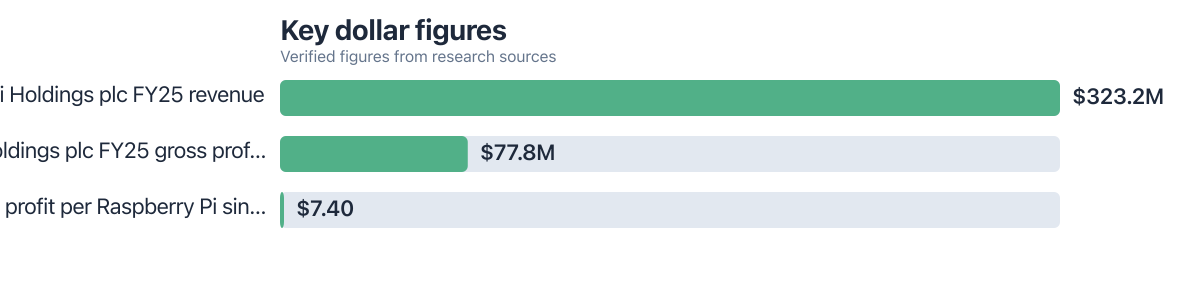
Picture a student in Portland trying to decide whether this is worth the hassle. It usually is. With over 73M+ units sold, the Pi remains one of the cheapest doors into real system administration work. Raspberry Pi Holdings plc posted $77.8M in gross profit on 7 million units sold in 2024 alone.
By late 2025, students at Portland State University are staring down rising software subscription costs and campus servers they can’t touch. A Pi fills that gap. It can host personal backups, study tools, or a lightweight web app, even from a dorm room with locked-down Wi-Fi. The real payoff isn’t the hardware. It’s the hands-on DevOps experience you can’t get from a textbook. How Solo Developers Ship Full Apps in 14 Days Using AI Code Assistants shows how much faster this work goes once automation enters the picture.
| Column 1 | Column 2 | Column 3 |
|---|---|---|
| Factor | Reasons to Build a Pi Server | Reasons Not to Build a Pi Server |
| Cost | Under $145 total build cost with used or discounted parts | Over $200 spent on new components |
| Power Use | Consumes 5–8W at idle, saving up to 85% compared to legacy desktops | Requires constant high-power setup with cooling fans or UPS for sustained use |
| Network Access | Works with CGNAT using cloudflared tunnels or Tailscale, even in dorms | Network blocks SSH, port forwarding, or outbound connections |
| Use Case | Running static sites, file sync, AI inference on small models, learning Docker | Hosting live databases, video streaming, or high-traffic apps that need consistent performance |
| Longevity | Proven stable over 2+ years with proper cooling and SD card care | SD card fails after 18 months of heavy logging without regular backups |
| Portability | Compact, lightweight, fits in a backpack with no external power adapter | Overheats without active cooling in summer dorms or apartments without AC |
Key Takeaways
- Build a Raspberry Pi server in 2025 if your total BOM cost is under $145 and you have reliable internet with outbound access.
- Avoid it if your dorm or apartment blocks SSH, requires full port forwarding, or you need enterprise-grade uptime.
- The Pi should draw less than 8W at idle to justify power savings over cloud alternatives. In Portland, that’s about $6.80/year in electricity costs.
- Plan for at least one month of free time to complete setup and testing without missing deadlines.
- Consider a Pi 5 with NVMe support if you plan to use SSD storage for long-term projects.
- Use a recycled or 3D-printed case to avoid dorm storage issues and fit your aesthetic preferences.
- Regularly backup SD card data, as it may fail after 18–24 months of constant logging without proper care.
Is the Cost vs Cloud Savings Worth It in 2025?
Depends entirely on how you use it. Keep the server under 8W and skip the subscriptions, and you come out ahead. Need enterprise uptime or serious storage? Not so much.
Run the numbers for Portland. At $0.13/kWh, a Pi 5 pulling 6W around the clock costs roughly $6.80 a year in electricity. A $15/month cloud VPS runs $180 a year, for comparison. Stretch that out three years and you’re looking at savings north of $480. Oregon’s grid is about 90% renewable too, so the carbon math works out even better than the dollar math.
None of this holds if you need to handle real traffic, though. A Pi 5 chokes on heavy MySQL workloads or real-time video streaming. It’s built for static sites, personal wikis, small AI inference jobs, that sort of thing. Raspberry Pi Holdings reported a gross profit of $7.40 per unit in 2024, which tells you the pricing is lean by design, not an accident.
How a Grad Student Tracked Focus, Sleep, and Stress With One $80 Gadget makes a similar point about cheap hardware punching above its weight. Point a Pi at your own uptime and power logs over a few months, and you’ll find real ways to trim the setup further.
Can You Access Your Pi Server from a Dorm with CGNAT?
Usually, yes. It takes some setup work, though. Tools like Tailscale or cloudflared solve the CGNAT problem for most students. If your network blocks outbound traffic entirely or runs deep packet inspection, none of that will save you.
Portland dorms lean heavily on CGNAT, which kills direct port forwarding before you even start. Tailscale gets around that by building a secure tunnel straight to your Pi’s services, no open ports required. Homelab threads on Reddit from early 2025 are full of students doing exactly this, without hitting firewall walls.
One student documented the whole thing running a Pi 5 on Debian, up and running with Tailscale in about 30 minutes. Compare that to weeks of back-and-forth emails with campus IT, and the DIY route starts looking pretty reasonable.
Is the Pi 5 Still Viable in 2025 Compared to Mini PCs?
For light, educational projects, yes, easily. For anything demanding sustained performance or serious storage growth, no.
The PCIe NVMe support on the Pi 5 changed the calculus quite a bit. Stick a 1TB NVMe SSD in a Pi 5 enclosure and you’re getting 1,200 MB/s read speeds, faster than plenty of older mini PCs still in circulation. Raspberry Pi Holdings confirmed in 2025 that this configuration has seen wide adoption among hobbyists and students alike.
Mini PCs from ASUS or Intel still win on sustained workloads, no question. But for a CS student, the Pi 5 teaches Docker, systemd, and remote access management without much financial risk if you break something. Pi My Life Up notes in its 2025 coverage that the Pi still handles static web serving and lightweight AI tasks just fine.
It won’t replace a full Linux server, or a $100 mini PC, once you actually need consistent I/O performance. How a Micro Agency used comparable hardware to run client pipelines, proof that even small servers scale past hobby projects when the use case fits.
Who Should and Who Should Not
Good candidates
Students who want to learn system administration, host personal projects, or reduce cloud spending.
- A CS major at Portland State University with a budget under $150, access to a 3D printer, and a desire to learn.
- A digital media student building a portfolio site with static content and needing file sync for a 150GB archive.
- Someone using free campus Wi-Fi willing to use Tailscale or cloudflared for remote access.
- A learner with prior Linux experience, comfortable navigating error messages.
- A student who can dedicate 2–3 hours a week to maintenance and updates without missing deadlines.
Who should skip it
Students who need high-availability services, live in dorms with no outbound access, or lack time for troubleshooting.
- A non-technical student with a $50 budget and no Linux background; cloud solutions are faster.
- Someone in a dorm where SSH is blocked due to network restrictions or deep packet inspection.
- A student whose coursework demands a reliable, high-performance environment (e.g., for video editing).
- Anyone planning to host large databases, streaming servers, or AI models larger than 10GB.
- A user expecting zero downtime and unable to handle SD card corruption or overheating issues.
Case Study: A Portland Student’s Pi Server Journey (2025)
Meet Maya. She’s a junior studying computer science at Portland State. She put together a Raspberry Pi 5 server for under $130, using a second-hand case, a used SSD, and a refurbished power supply she found through a campus surplus sale. Her goal was simple: host her senior project, an AI-powered study assistant, and stop paying $15 a month for cloud hosting.
CGNAT at her dorm nearly derailed the whole plan. She got past it with Tailscale, though not without a few frustrating nights of troubleshooting first. She leaned on AI code assistants to write her auto-backup and monitoring scripts, which cut hours off the setup.
Six months in, Maya had saved over $80 in cloud fees. More importantly, she’d picked up DevOps skills she couldn’t have gotten from a lecture. She now runs her personal blog off the Pi, tests Docker containers on it, and even runs a small computer vision demo for a class project on facial recognition ethics, minus the surveillance-everywhere part.
Action Plan: Build Your Pi Server in 2025 (Step-by-Step)
Here’s the sequence that works:
- Check your network: Confirm outbound SSH connectivity. If not, plan to use Tailscale or cloudflared.
- Set a budget: Aim for under $145 using used parts like a $50 Pi 5, $25 SSD, and a recycled case.
- Choose your OS: Install Raspberry Pi OS Lite or Ubuntu Server. Avoid desktop versions unless needed.
- Enable SSH and configure networking: Use `sudo raspi-config` to enable SSH and set a static IP if possible.
- Set up tunneling: Install Tailscale or cloudflared immediately. Test access from your phone.
- Deploy your project: Start with a static site or file sync. Use scheduling tools to manage updates.
- Maintain: Update weekly. Replace SD cards every 18–24 months. Monitor temperature with a simple script.
Frequently Asked Questions
Is it worth building a Raspberry Pi server in 2025 with a $150 budget?
Depends on your needs. If you can keep costs under $145 with used parts and you’re playing the long game on savings, it’s a solid bet.
Can you run a website on a Raspberry Pi 5 in 2025?
For low-traffic or static sites, sure. For anything database-heavy or high-traffic, look elsewhere.
Is the Pi 5 worth it over a mini PC for learning DevOps?
For learning fundamentals, absolutely. Real-world sustained workloads are still a mini PC’s territory.
How much does a Pi 5 server cost to run annually?
At Portland’s average rate of $0.13/kWh, a Pi 5 running 24/7 at 6W idle costs about $6.80/year in electricity.
Can you access your Pi server from a dorm with no port forwarding?
Yes. Tailscale, cloudflared, and similar tunneling tools are built precisely for CGNAT situations like this.
Sources
- Raspberry Pi Holdings plc (2025), Annual Report
- ElectricityMap, Oregon energy mix and rates (2025)
- Pi My Life Up, Raspberry Pi server viability in 2025
- Reddit, Homelab user success with CGNAT (2025)
- How Solo Developers Ship Full Apps in 14 Days Using AI Code Assistants
- How a Grad Student Tracked Focus, Sleep, and Stress With One $80 Gadget
- How a Micro Agency used a similar platform to manage client pipelines.
- Small retailers using computer vision for security






