
Quick Answer
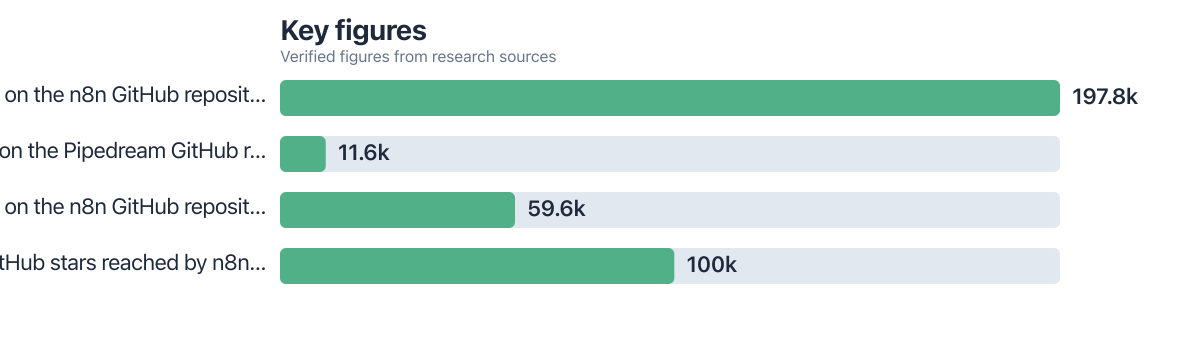
For complex multi-service workflows, n8n generally wins over Make and Pipedream because of execution-based pricing, unlimited self-hosting, and no hard per-step time limits. n8n’s GitHub repository has surpassed 197.8k stars as of the latest data, more than 17 times Pipedream’s 11.6k stars.
Updated December 2025
The n8n vs Make question comes up constantly among teams building automations that touch five or more services at once: CRM updates, payment webhooks, database writes, Slack alerts, and an AI summarization step, all in one chain. The short version: n8n handles this kind of branching, error-heavy workflow better than Make or Pipedream in most cases, mainly because of how it prices executions and how it lets you self-host without limits. Its GitHub repository crossed 100k stars in May 2025, a milestone the n8n community documented as a sign of accelerating adoption among developers building serious automation infrastructure.
That popularity isn’t just vanity metrics. According to GitHub’s public repository data, n8n has accumulated 59.6k forks, a figure that reflects how many developers have copied the codebase to build custom variants or contribute back (GitHub, 2026). Pipedream, by contrast, sits at roughly 11.6k stars on its own repository (GitHub, 2026), suggesting a smaller but still active developer community centered on its code-first approach. Make doesn’t publish an open-source repository at all, since it’s a closed cloud platform, which already tells you something about the control tradeoffs at stake.
This guide breaks down the architecture, pricing math, and edge-case handling that actually matter once a workflow grows past the simple “trigger, filter, send” pattern most tutorials cover. You’ll get a real cost comparison for a 10-step workflow, a look at where Pipedream’s execution limits bite, and a straight recommendation for which tool fits which team.
Key Takeaways
- n8n’s GitHub repository has more than 197.8k stars (GitHub, 2026), making it the most starred open-source workflow automation tool of the three compared here.
- n8n crossed 100,000 GitHub stars in May 2025 (n8n Community, 2025), a growth signal that outpaces Pipedream’s total star count several times over.
- Pipedream’s repository holds 11.6k stars (GitHub, 2026), reflecting a smaller but dedicated developer base focused on code-first workflows.
- n8n has 59.6k forks on GitHub (GitHub, 2026), indicating heavy developer customization and community contribution activity.
- Pipedream applies default execution time limits of 30 to 60 seconds per step, which can break long-running multi-service workflows that n8n handles without a hard cap when self-hosted.
- n8n prices by workflow execution rather than by individual operation, so a 50-step branching workflow can count as a single billable execution instead of 50 separate charges.
In This Guide
- What Makes a Workflow Actually Complex?
- How Do n8n, Make, and Pipedream Build Workflows Differently?
- How Deep Are the Integrations Across Services?
- Where Does Pipedream Fall Short on Long-Running Workflows?
- How Do the Three Tools Scale and Recover From Failures?
- What Does a 10-Step Workflow Actually Cost on Each Platform?
- Which Platform Has the Strongest AI and Agent Support?
- What About Data Residency and Compliance?
- Is Migrating From Make or Pipedream to n8n Worth the Effort?
- Which Tool Wins for Complex Multi-Service Workflows?
What Makes a Workflow Actually Complex?
A workflow becomes “complex” once it involves conditional branching, data transformation across multiple formats, and recovery logic for at least three or more failure points. That’s the practical threshold where a simple automation platform starts to strain.
Think about a real setup: a new Stripe payment triggers a lookup in Salesforce, which then branches based on customer tier, writes to a Postgres database, sends a personalized Slack message, and kicks off an AI-generated follow-up email if the deal size crosses a threshold. That’s five services, two branches, one AI call, and at least two places where something can silently fail: a rate limit on the Salesforce API, or a malformed field in the database write. Multiply that by hundreds of runs per day and you have a genuinely complex, long-running workflow.
Complexity also shows up in the shape of the data itself. Multi-service workflows often need to reshape JSON from one service into the schema another service expects, sometimes multiple times in a single chain. A workflow that just moves a message from Gmail to Slack isn’t complex. One that pulls invoice data from QuickBooks, cross-references it against a CRM record, calculates a custom discount, and updates three separate systems while logging every failure for manual review, that’s the kind of chain where tool choice actually matters.
Most automation platform comparisons focus on simple two-step “if this, then that” chains. Real production workflows in finance, operations, and customer support teams routinely run eight to fifteen steps with multiple conditional branches, a very different test of a platform’s limits.
How Do n8n, Make, and Pipedream Build Workflows Differently?
n8n uses a node-based visual canvas that lets you drop in JavaScript or Python code directly inside any node, Make relies on a scenario-and-module structure built almost entirely around clicking through configuration panels, and Pipedream leans code-first with an optional visual layer on top. These three approaches produce very different experiences once a workflow grows past ten steps.
On n8n’s canvas, each node represents one action or logic step, and you can drop a “Code” node anywhere in the chain to write custom transformation logic without leaving the platform. This matters for teams that need to handle edge cases that don’t map cleanly to a pre-built connector. Make’s scenario builder, by comparison, requires stacking more modules and router branches to achieve the same logic, which increases the visual clutter and the number of clicks needed to build or debug a workflow (a pattern documented across teams comparing make zapier n8n: which ai automation approach fits their skill level).
Pipedream flips the default: every step starts as a code block (usually Node.js or Python), with pre-built “actions” available for common integrations. This gives experienced developers granular control, but it also means non-technical team members hit a steeper learning curve compared to n8n’s more visual-first default state or Make’s fully clickable interface.
Loops, Parallel Execution, and Custom Logic
n8n and Pipedream both support native loops and parallel branches without artificial step limits in most configurations, while Make’s loop module can become sluggish and expensive once iteration counts climb into the thousands, since each loop iteration typically consumes its own operation count. For workflows that need to process a batch of 500 database records with custom logic applied to each one, that operation-based billing model in Make adds up fast, a cost dynamic we’ll walk through with real numbers later in this guide.
How Deep Are the Integrations Across Services?
Native connector quality matters more than raw integration counts once you’re troubleshooting authentication failures or rate limits at 2 a.m. All three platforms claim thousands of integrations, but depth varies sharply for complex services like Salesforce, Stripe, and direct database connections.
n8n’s Salesforce and Stripe nodes support most common operations out of the box, and its HTTP Request node lets you hit any REST or GraphQL endpoint directly when a native connector doesn’t cover an edge case, such as a custom Salesforce object or a Stripe webhook event that isn’t natively mapped. Make offers similarly broad connector coverage through its module library, though building a custom API call in Make often requires more manual header and authentication configuration compared to n8n’s credential management system, which persists OAuth tokens and automatically handles refresh cycles for most services.
Pipedream’s advantage here is its code-first nature: since every action is fundamentally a code step, developers can call any API directly with full control over headers, retries, and pagination logic, without waiting for an official connector to be built. That flexibility is real, but it also shifts the maintenance burden onto the person writing the workflow rather than the platform itself.
Webhooks, Polling, and Fallback Handling
Webhook reliability differs meaningfully across the three platforms when a downstream service goes down temporarily. n8n’s error workflow feature lets you attach a dedicated fallback workflow to any node, so a failed Salesforce write can automatically trigger a retry, a notification, or a queued reprocessing job. Make offers similar error handlers at the scenario level, but configuring them for individual modules inside a complex branch takes more setup steps than n8n’s centralized error workflow model.
Polling versus instant triggers is another area worth flagging directly, since it’s rarely covered in basic comparisons. Services without native webhook support (some legacy CRMs and internal databases, for instance) force all three platforms to fall back on polling, checking for new data every few minutes rather than reacting instantly. In multi-service chains, this polling delay compounds: if three separate services in a single workflow each poll every five minutes, the total latency from the first event to the final action can stretch to fifteen minutes or more, something teams rarely account for when designing supposedly “real-time” automations.
Where Does Pipedream Fall Short on Long-Running Workflows?
Pipedream’s default execution time limits, typically 30 to 60 seconds per step, create a hard ceiling for workflows that involve slow API responses, large file processing, or multi-stage AI reasoning chains. This is the single biggest constraint that separates Pipedream from n8n in genuinely complex, long-running automation scenarios, and it’s an angle most comparison articles skip entirely.
If your workflow includes a step that waits on a slow third-party API, processes a large CSV import, or chains multiple AI model calls in sequence, Pipedream’s per-step timeout can silently kill the execution partway through. Self-hosted n8n has no equivalent default cap, since you control the underlying server resources directly.
How Do the Three Tools Scale and Recover From Failures?
Self-hosted n8n scales primarily by the server resources you provision, which means a team running Docker or Kubernetes can handle tens of thousands of daily executions without hitting an artificial platform ceiling, as long as the underlying infrastructure keeps up. Make and Pipedream, as cloud-only (or cloud-first) platforms, cap execution volume and concurrency according to your subscription tier, which introduces a different kind of scaling risk: hitting a plan limit mid-month and needing to upgrade or throttle workflows unexpectedly.
Retry logic differs too. n8n lets you configure retry attempts and wait intervals directly on individual nodes, so a temporary Stripe API hiccup doesn’t kill the entire multi-service chain. Make’s error handler routes exist at the module level, offering comparable functionality but requiring more explicit configuration across each branch of a complex scenario. Pipedream supports retries within its code steps, but developers need to write that retry logic manually in most cases rather than toggling a built-in setting, which again shifts complexity onto the person building the workflow.
For monitoring, all three platforms offer execution history dashboards, but self-hosted n8n gives teams the option to pipe logs into their own observability stack (Datadog, Grafana, or a custom database), which matters for organizations with existing infrastructure monitoring requirements. Cloud-only platforms tie you to whatever dashboard they provide, which is often sufficient for smaller teams but limiting for larger operations teams managing hundreds of interdependent workflows.
n8n’s GitHub repository has accumulated 59.6k forks according to GitHub’s 2026 repository data, a strong signal of how many developers are actively customizing or self-hosting their own instances rather than relying solely on the cloud version.
What Does a 10-Step Workflow Actually Cost on Each Platform?
Execution-based pricing on n8n typically costs less than operation-based pricing on Make once a workflow crosses roughly ten steps with branching logic, because n8n counts an entire workflow run as one execution regardless of how many nodes it touches. This is the core pricing distinction that most surface-level comparisons gloss over.
Consider a concrete example: a workflow that pulls a new Stripe payment, checks it against a Salesforce record, branches into two paths depending on customer tier, writes to a Postgres database, sends a Slack notification, and calls an AI model to draft a follow-up email. That’s roughly ten steps. On n8n, this entire chain, however many branches it takes, counts as a single execution. Run it 10,000 times a month, and you’re billed for 10,000 executions, not for each of the ten individual steps inside them.
On Make, the same workflow is typically billed per completed module operation. If each run touches roughly eight to ten modules (accounting for router branches, which each count separately), that 10,000-run month could translate into 80,000 to 100,000 billable operations, since Make’s pricing tiers are structured around operation counts rather than full workflow runs. The exact multiplier depends on how many modules actually execute per branch, but the difference in billing philosophy alone means Make’s cost scales more steeply as workflow step count grows, particularly for scenarios with heavy branching or looping.
Self-hosting n8n adds infrastructure cost instead of per-execution fees: a small VPS running Docker (roughly $20 to $40 a month for a modest instance capable of handling moderate volume) replaces the subscription entirely, and that cost stays flat whether you run 5,000 or 50,000 executions a month, within the server’s processing capacity. That flat-cost model is the main reason teams running high-volume, multi-branch workflows increasingly migrate to self-hosted n8n once their Make or Pipedream bill starts climbing past a few hundred dollars monthly.
| Pricing Factor | n8n (Self-Hosted) | Make | Pipedream |
|---|---|---|---|
| Billing unit | Flat infrastructure cost | Per operation | Per credit/invocation |
| Cost driver | Server capacity, not step count | Number of modules executed per run | Number of workflow invocations plus compute time |
| 10-step branching workflow cost impact | Same flat monthly server fee regardless of branch count | Scales with every module and router branch executed | Scales with invocations; execution timeouts can force step splitting |
| Self-hosting available | Yes, via Docker or Kubernetes | No, cloud-only | No, cloud-only |
None of this means Make or Pipedream are bad choices for every team. A small business running a handful of simple two-step workflows a few hundred times a month will likely find Make’s flat subscription tiers perfectly affordable and far easier to manage than provisioning a server. The math shifts specifically once branching complexity and execution volume both climb at the same time, which is exactly the scenario this article is built around.
Real-World Example: A Support Ops Team Rebuilds Its Ticket Routing
Consider an illustrative example: a 12-person customer support operation was running a ticket-routing workflow on Make that pulled new Zendesk tickets, checked customer tier in HubSpot, branched into three priority paths, wrote a log entry to Airtable, and sent a Slack alert for high-priority cases. At roughly 8,000 tickets a month, with an average of nine module executions per ticket (accounting for the three-way router branch), the team was hitting close to 72,000 operations monthly, pushing them into a higher Make subscription tier costing several hundred dollars a month.
After migrating the same logic to self-hosted n8n running on a $35-a-month VPS, the team rebuilt the workflow in roughly three days, mapping each Make module to an equivalent n8n node and replacing two custom filter modules with a single Code node running a JavaScript conditional. Monthly execution volume stayed the same at 8,000 tickets, but because n8n counts the entire routing chain as one execution per ticket rather than nine separate operations, their effective cost dropped to the flat server fee plus a few hours of monthly maintenance. The team also gained the ability to attach a dedicated error workflow that automatically retried failed HubSpot lookups, something they’d previously handled manually when Make’s error handler silently dropped a branch.
Which Platform Has the Strongest AI and Agent Support?
n8n currently offers the deepest native AI agent support of the three platforms, including built-in LangChain-based nodes that support hierarchical agent patterns and connections to local or self-hosted language models. This matters increasingly as multi-service workflows start incorporating AI reasoning steps rather than just data movement.
Make has added AI-related modules for common providers like OpenAI and Anthropic, letting users insert a language model call as one step in a scenario, but it lacks the deeper agent orchestration patterns (tool use, memory, multi-step reasoning chains) that n8n’s LangChain integration supports natively. Pipedream, being code-first, technically allows a developer to write any AI orchestration logic directly into a code step, offering flexibility comparable to building a custom agent from scratch, but that requires meaningfully more coding effort than n8n’s pre-built agent nodes.
For teams building workflows where an AI step needs to decide which branch to take next (an approach increasingly common in support ticket triage, lead qualification, or document processing pipelines), n8n’s native agent framework reduces the amount of custom code needed compared to hand-rolling that logic in Make’s limited AI modules or Pipedream’s code steps. This aligns with a broader shift teams are already navigating when they compare solo accountant used ai automation to cut manual reporting time, since the underlying agent orchestration challenge is similar across use cases.
Before building an AI agent step into any workflow, prototype the reasoning logic in a simple script first. It’s far easier to debug a branching AI decision path in isolated code than inside a visual canvas once it’s wired into five other services.
What About Data Residency and Compliance?
Self-hosted n8n gives teams full control over where data physically lives, which matters directly for organizations handling regulated data under GDPR or HIPAA-adjacent requirements. Cloud-only platforms like Make and Pipedream process and, at least temporarily, store workflow data on their own infrastructure, which can complicate compliance reviews for healthcare, financial services, or EU-based organizations with strict data residency rules.
This is one of the more overlooked angles in most automation platform comparisons, but it carries real weight for regulated industries. A healthcare operations team automating patient intake data across a CRM, a scheduling system, and a billing platform needs to know exactly which servers touch that data at every step. With self-hosted n8n, that answer is straightforward: the data stays on infrastructure the organization controls entirely, whether that’s an on-premises server or a private cloud instance in a specific geographic region.
With Make or Pipedream, the data necessarily passes through each vendor’s cloud infrastructure, and while both companies publish security documentation and compliance certifications, the underlying architecture still means a third party is processing your workflow data, even if only transiently. For teams weighing this tradeoff, it’s worth checking each vendor’s current security and compliance documentation directly, since certification status and data center regions can change. The GDPR’s official guidance on data processing is a useful starting reference point for understanding what obligations apply when workflow data crosses borders through a cloud automation vendor.
Is Migrating From Make or Pipedream to n8n Worth the Effort?
Migrating a complex multi-service workflow from Make to n8n typically takes two to five days for a workflow with eight to twelve steps, depending on how many custom modules and branching paths need to be rebuilt. Whether that time investment pays off depends heavily on execution volume and how much the current platform’s limitations are actually costing in either dollars or manual firefighting.
Teams running under 5,000 monthly executions with simple branching rarely see enough cost or reliability benefit to justify a migration; the server management overhead of self-hosting n8n can outweigh the savings at that scale. The math changes once a team is running 20,000 or more executions a month with heavy branching, multiple error-prone API integrations, or AI steps that need more processing time than Pipedream’s default limits allow. In those cases, the rebuild effort typically pays for itself within one to two months through reduced platform fees alone, not counting the reliability gains from centralized error workflows.
One honest caveat worth naming: self-hosting n8n shifts responsibility for uptime, security patching, and server maintenance onto your own team (or whoever manages your infrastructure). That’s a real tradeoff, not a footnote. Teams without any DevOps capacity at all may find n8n’s cloud-hosted tier a better middle ground, since it retains the execution-based pricing model without requiring server management, though it does reintroduce a subscription cost.
For teams managing multiple client workflows or contractor relationships alongside their automation stack, the operational discipline needed to track which workflows live where mirrors challenges covered in guides on best vendor management apps small businesses use to keep multiple service relationships organized.
Which Tool Wins for Complex Multi-Service Workflows?
n8n is the stronger choice for genuinely complex, high-volume, multi-service workflows: its execution-based pricing, unlimited self-hosting, native AI agent support, and lack of hard per-step time limits address the exact pain points that surface once a workflow crosses eight to ten steps with branching logic. Make remains a solid choice for teams that want a fully managed cloud experience and are running lighter workflow volumes without heavy branching. Pipedream fits best for developer teams that want granular code control over each step and don’t need long-running processes beyond its default execution windows.
The one clear exception: if your team has zero appetite for managing servers, even a lightweight VPS, and your workflow volume stays modest, Make’s cloud simplicity will likely serve you better than fighting with Docker deployments for marginal cost savings. Match the tool to your actual operational capacity, not just the theoretical ceiling of what it can do.
Teams often start their automation journey on Zapier or Make for simplicity, then migrate to n8n specifically once they hit either a cost wall from operation-based billing or a complexity wall from workflows that need custom code logic, a pattern reflected in broader comparisons of make zapier n8n: which guide fits beginners versus scaling teams.
Your Action Plan
-
Map your current workflow’s step count and branch complexity.
Write out every service touchpoint, conditional branch, and error-handling need in your busiest existing automation. If it exceeds eight steps with two or more branches, you’re likely in the range where n8n’s pricing model starts winning.
-
Check your actual monthly execution or operation volume.
Log into your current Make or Pipedream dashboard and pull your last three months of usage data. If you’re consistently above 20,000 operations or hitting plan limits, calculate what a flat-cost self-hosted alternative would save.
-
Spin up a test n8n instance using Docker.
Follow n8n’s official self-hosting documentation at docs.n8n.io to deploy a test instance on a low-cost VPS provider like DigitalOcean or Hetzner before committing to a full migration.
-
Rebuild your most complex workflow first, not your simplest one.
Start the migration with the workflow that’s costing you the most in operations or causing the most reliability headaches, since that’s where the payoff is clearest and fastest.
-
Set up error workflows and monitoring before going live.
Configure n8n’s error workflow feature to catch failures and route them to a Slack channel or email alert, replicating whatever fallback logic existed in your previous platform.
-
Run both platforms in parallel for two weeks before fully switching.
Keep your existing Make or Pipedream workflow active as a backup while the new n8n version runs in production, comparing execution logs daily to confirm parity before decommissioning the old workflow.
Frequently Asked Questions
Is n8n really cheaper than Make for complex workflows?
Generally yes, once a workflow involves branching logic across eight or more steps run at meaningful volume. n8n’s execution-based pricing counts an entire workflow run as one billable unit, while Make bills per module operation, which scales up quickly for workflows with multiple router branches.
Can Pipedream handle long-running AI workflows?
Not well by default. Pipedream applies execution time limits of roughly 30 to 60 seconds per step, which can interrupt workflows involving slow API calls or multi-stage AI reasoning unless you restructure the logic to fit within those windows.
Do I need coding skills to use n8n effectively?
Basic workflows don’t require any coding, since n8n’s visual canvas covers most common operations. Complex multi-service workflows benefit significantly from knowing basic JavaScript, since n8n’s Code node lets you handle edge cases that pre-built connectors don’t cover.
Is self-hosting n8n secure enough for sensitive data?
Self-hosting can be more secure for regulated data, since your organization controls the server environment entirely rather than routing data through a third-party cloud platform. That security depends on your team properly configuring server access, encryption, and patching, which is a real responsibility, not an automatic benefit.
How many integrations does n8n support compared to Make?
Both platforms support several hundred native connectors, and both allow custom API calls via HTTP request nodes for services without a pre-built integration. Raw integration count matters less than how well each connector handles authentication persistence and edge cases for services like Salesforce or Stripe.
What happens if my n8n server goes down?
Your workflows stop running until the server is restored, which is the core tradeoff of self-hosting. Cloud-hosted n8n or platforms like Make and Pipedream carry their own uptime commitments, so teams without infrastructure capacity should weigh that reliability difference carefully before choosing to self-host.
Which tool is best for a small team with no developer on staff?
Make is typically the easier starting point for non-technical teams, since its module-based interface requires no code and its cloud hosting removes any server management burden. n8n’s cloud-hosted tier is a reasonable middle ground if execution-based pricing appeals but self-hosting isn’t feasible.
Can I migrate a Make scenario directly into n8n?
There’s no automatic one-click migration tool between the two platforms, so migration means manually rebuilding the logic node by node. Most teams find this takes two to five days for a workflow with eight to twelve steps, depending on branching complexity.
Does Pipedream support self-hosting like n8n?
No, Pipedream is a cloud-only platform with no self-hosting option, which means teams with strict data residency requirements or high-volume cost concerns don’t have the same infrastructure control available with n8n.
Sources
- GitHub, n8n-io/n8n Repository Statistics
- GitHub, PipedreamHQ/pipedream Repository Statistics
- n8n Community, 100k Stars on GitHub Milestone
- n8n Documentation, Self-Hosting Guide
- GDPR.eu, What Is GDPR
- Make, Official Pricing Page
- Pipedream, Official Pricing Page
- n8n, Official Pricing Page
- Docker, What Is a Container (Self-Hosting Reference)
- CISA, Cybersecurity Best Practices for Self-Hosted Infrastructure






