Fact-checked by the ZeroinDaily editorial team
Quick Answer
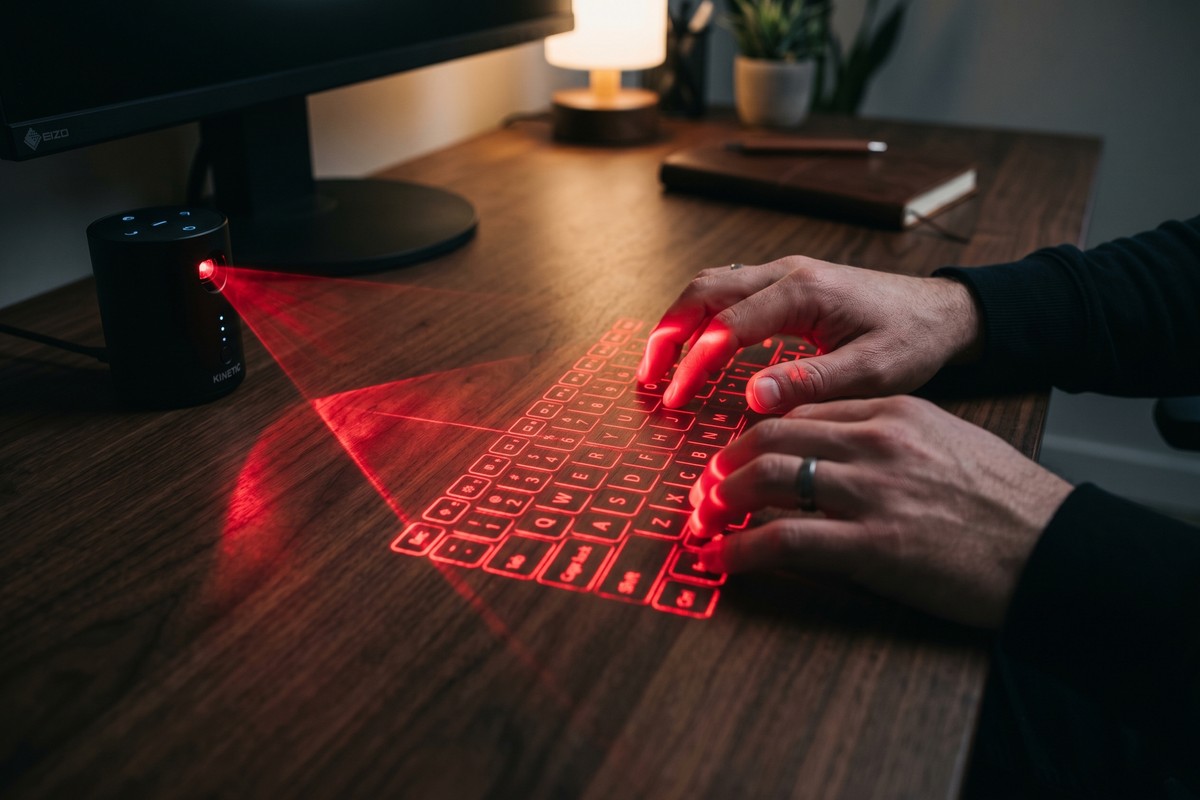
A portable laser keyboard projects a full-size QWERTY layout onto any flat surface using infrared laser technology, giving you a physical-feeling keyboard that fits in your pocket. As of July 2025, quality models start at around $40 and connect via Bluetooth or USB. To buy smart, you need to evaluate projection clarity, battery life, device compatibility, and keystroke accuracy before committing.
A portable laser keyboard — also called a virtual keyboard or projection keyboard — uses a laser module and an infrared sensor to detect finger movements on a flat surface, translating them into keystrokes sent to your phone, tablet, or laptop. As of July 2025, the global virtual keyboard market is valued at over $4.8 billion according to Grand View Research, driven by the explosion of mobile-first workers who need compact input tools without sacrificing typing speed.
Remote work and digital nomadism have made compact productivity tools more critical than ever. Analysts project the portable input device segment will grow at a compound annual growth rate of 14.2% through 2030, as smartphones and tablets increasingly replace laptops for on-the-go tasks. That growth means more brands, more price points, and more confusion for buyers.
This guide is for anyone — remote workers, frequent travelers, students, and tech enthusiasts — who wants a clear, honest breakdown of how portable laser keyboards work, what separates a good one from a bad one, and exactly what to look for before spending a dollar. By the end, you will know whether a laser keyboard fits your needs and how to pick the right model with confidence.
Key Takeaways
- The virtual keyboard market exceeded $4.8 billion in 2024, reflecting rapid mainstream adoption of projection input devices, according to Grand View Research.
- Most portable laser keyboards project a keyboard image roughly A4 paper-sized (roughly 295 x 95 mm), which is close to a standard desktop keyboard layout.
- Battery life on mid-range models typically runs 120 to 150 minutes of continuous use, so extended typing sessions require access to a charging cable.
- Infrared sensor accuracy in premium models reaches up to 400 characters per minute recognition speed, competitive with average human typing rates of 200–300 keystrokes per minute.
- Most current models support Bluetooth 5.0 and are compatible with iOS, Android, Windows, and macOS — but always verify before purchase.
- Surface reflectivity is the most common performance killer — glossy, dark, or uneven surfaces can reduce accuracy by up to 30% compared to a matte white surface.
In This Guide
- How does a portable laser keyboard actually work?
- What should I look for when buying a portable laser keyboard?
- Is a laser keyboard actually good for typing, or is it just a novelty?
- How do I connect a portable laser keyboard to my phone or laptop?
- Who should buy a portable laser keyboard, and when does it make sense?
- How do I get the best performance out of my laser keyboard?
- Frequently Asked Questions
Step 1: How Does a Portable Laser Keyboard Actually Work?
A portable laser keyboard works by projecting a red or violet laser beam through a diffractive optical element (DOE) to display a keyboard image on any flat surface, while a second infrared beam just above the surface detects finger interruptions and maps them to specific key positions. The device then sends those keystrokes wirelessly to your paired device via Bluetooth or a USB dongle.
The Core Technology Explained
The hardware inside a typical unit includes three main components: a laser diode (usually 650 nm red laser) that projects the keyboard image, an infrared laser that creates an invisible detection plane hovering about 4 mm above the surface, and a CMOS image sensor that tracks finger interruptions in real time. When your fingertip breaks the infrared plane above a projected key, the sensor calculates the X-Y position and triggers the corresponding keystroke. Processing happens inside the device’s onboard microcontroller before the signal is sent to your paired device.
The entire unit typically weighs between 55 and 90 grams — lighter than most smartphones. Brands like Celluon (makers of the Magic Cube), AGS, and SHOWME are among the most recognized manufacturers in this space.
What to Watch Out For
The infrared detection plane is very thin — roughly 4 mm — which means the device requires a completely flat, stable surface to function correctly. Slightly curved or textured surfaces cause missed or phantom keystrokes. Ambient infrared light sources (direct sunlight, some LED panels) can also interfere with the sensor’s ability to isolate your finger movements.
The projection keyboard concept was first patented by IBM engineer Bradley Rye in 1992, but the first commercially available model did not reach consumers until the early 2000s. The technology has shrunk from a bulky desktop unit to a device smaller than a deck of cards in under two decades.
Step 2: What Should I Look for When Buying a Portable Laser Keyboard?
When buying a portable laser keyboard, the five factors that matter most are keystroke accuracy, battery life, surface compatibility, connectivity options, and projection brightness. Focusing on just price or size will lead to a frustrating experience.
The Five Key Buying Criteria
- Keystroke Accuracy Rate: Look for units advertising recognition speeds of at least 350 characters per minute. Budget models below this threshold produce noticeably more errors at normal typing pace.
- Battery Life: The practical minimum for a productive session is 90 minutes. Premium models offer up to 150–180 minutes on a single charge.
- Projection Brightness: Measured in visibility range, good models remain readable in typical indoor office lighting. Avoid using any laser keyboard in direct sunlight — the projected image washes out entirely.
- Connectivity: Bluetooth 5.0 is the current standard and offers a stable connection up to 10 meters. Older models using Bluetooth 3.0 can suffer from input lag of 50–80 ms, which is noticeable.
- Surface Requirements: Most units work best on white or light-colored matte surfaces. Some premium models include an auto-calibration feature that adjusts for moderate surface variation.
How to Evaluate Before You Buy
Check the product specifications for the exact Bluetooth version and battery capacity in milliamp-hours (mAh). A unit with a 1,200 mAh or larger battery will generally hit the 120-minute mark. Read verified user reviews specifically for comments about missed keystrokes and surface limitations — these are the two most common complaints across Amazon, Best Buy, and technology review sites like PCMag.
If you are also exploring other productivity gadgets for a home office setup, it is worth reviewing AI tools that are saving small businesses time in 2026 to see how laser keyboards fit into a broader efficient workspace strategy.
What to Watch Out For
Unbranded “no-name” units on discount marketplaces frequently overstate their accuracy and battery specs. If the listed battery life is over 200 minutes on a device priced below $30, treat that figure with skepticism. Always prioritize brands with verifiable customer support and a documented return policy.
Laser keyboards use Class 2 laser diodes, which are considered safe under normal use but should never be aimed directly at eyes. Check that any model you purchase carries a CE or FCC certification confirming it meets laser safety standards for consumer products.
| Model / Brand | Price (USD) | Battery Life | Bluetooth Version | Best For |
|---|---|---|---|---|
| Celluon Magic Cube | $99–$120 | 150 min | Bluetooth 3.0 | Heavy users, frequent travelers |
| SHOWME Laser Keyboard | $55–$75 | 120 min | Bluetooth 5.0 | Students, casual use |
| AGS Virtual Keyboard | $40–$60 | 90 min | Bluetooth 4.0 | Budget buyers, occasional use |
| DESTEK Laser Keyboard | $45–$65 | 100 min | Bluetooth 4.0 | Android-first users |
| Brookstone Projection Keyboard | $70–$90 | 130 min | Bluetooth 5.0 | iOS users, gift buyers |
The comparison above reflects mid-2025 pricing from major retail channels. Prices fluctuate, so verify current listings before purchasing.
Step 3: Is a Laser Keyboard Actually Good for Typing, or Is It Just a Novelty?
A portable laser keyboard is a genuinely useful tool for light-to-moderate typing tasks, but it is not a direct replacement for a mechanical or membrane keyboard for heavy daily use. Most experienced typists report a 15–25% reduction in speed during an adjustment period, with performance leveling out after 2–3 days of practice.
Real-World Typing Performance
The biggest ergonomic difference from a physical keyboard is the complete absence of tactile feedback. Your fingers touch a flat surface with no key travel, and the device relies on audio click feedback (a simulated click sound built into most units) to signal a successful keystroke. Research in human-computer interaction consistently shows that tactile and auditory feedback together reduce error rates compared to auditory feedback alone — which is why laser keyboards can feel disorienting at first.
A 2022 usability study published by the Association for Computing Machinery (ACM) found that experienced typists achieved an average of 47 words per minute on projection keyboards after a 30-minute adaptation session, compared to their baseline of 65 WPM on a standard keyboard. That is a meaningful gap for anyone writing long documents, but adequate for emails, messages, and short-form content.
Who It Works Well For
- Smartphone users who need to respond to long emails without carrying a Bluetooth keyboard
- Tablet users in meetings or on-the-go who need faster input than an on-screen keyboard
- Anyone who values pack size and weight over peak typing performance
What to Watch Out For
Do not expect to match your desktop typing speed immediately. Plan a deliberate practice period. Also note that laser keyboards do not support multi-key rollover in the same way physical keyboards do — rapid simultaneous key presses (common in gaming) are not supported by any current projection keyboard model.
“Projection keyboards occupy a very specific productivity niche. They excel at portability and novelty, but users who type more than two hours a day will consistently prefer a compact physical Bluetooth keyboard for sustained comfort and accuracy.”
Enable the audio click feedback on your laser keyboard from day one. Studies in haptic and audio interface design consistently show that auditory confirmation of keystrokes accelerates the adaptation period and reduces error rates during the learning curve.
Step 4: How Do I Connect a Portable Laser Keyboard to My Phone or Laptop?
Connecting a portable laser keyboard to any device takes under two minutes and follows the same Bluetooth pairing process used for wireless headphones or speakers. The exact steps vary slightly by operating system, but the core sequence is the same across iOS, Android, Windows, and macOS.
Step-by-Step Pairing Instructions
- Power on the laser keyboard by pressing and holding the power button for 2–3 seconds until the indicator light begins flashing, signaling it is in pairing mode.
- On your device, open Settings and navigate to Bluetooth. Make sure Bluetooth is turned on.
- Select the keyboard from the list of available devices. It typically appears as “Virtual Keyboard,” “Laser KB,” or the specific brand name (e.g., “Celluon Magic Cube”).
- Confirm pairing — some models display a PIN code (usually “0000” or “1234”) that you type using the projected keyboard itself to complete the connection.
- Place the device on a flat, matte surface in front of you. Position the keyboard projector so the full QWERTY layout is visible and clear.
Connectivity Options Beyond Bluetooth
Some models, particularly older units, include a micro-USB or USB-A OTG cable for wired connection to Android devices or Windows PCs. This wired option eliminates Bluetooth latency entirely — useful for users who notice input lag in wireless mode. However, most modern portable laser keyboards are Bluetooth-only, with USB used only for charging.
For Windows users, the device appears in Device Manager under “Bluetooth Keyboards” and requires no additional driver installation on Windows 10 or 11. macOS similarly auto-recognizes the device through its standard HID (Human Interface Device) protocol.
What to Watch Out For
If your laser keyboard refuses to pair, the most common fix is to hold the power button for 10 seconds to reset the Bluetooth module, then re-enter pairing mode. Some units can only pair with one device at a time — switching between a phone and a tablet requires going through the pairing process again each time. Multi-device Bluetooth pairing (quick-switch between paired devices) is currently only available on a handful of premium models.
Bluetooth 5.0, used in newer portable laser keyboard models, delivers a theoretical range of up to 40 meters in open space and consumes 50% less power than Bluetooth 4.0, directly contributing to longer battery sessions between charges.
Step 5: Who Should Buy a Portable Laser Keyboard, and When Does It Make Sense?
A portable laser keyboard makes the most sense for travelers, remote workers with minimal bag space, and users who primarily type on smartphones or tablets rather than laptops. It is not the best choice for programmers, heavy-volume writers, or anyone who types for more than three hours per day.
Ideal User Profiles
- Business travelers: A laser keyboard weighs under 90 grams and adds zero bulk to a carry-on. It pairs with a smartphone or tablet, turning any hotel desk into a workstation.
- Students: Taking notes in class or the library without carrying a laptop case becomes practical when the keyboard fits in a jacket pocket.
- Digital nomads: Those building a minimal travel setup find laser keyboards complement a lightweight tablet — a combination that can weigh under 600 grams total.
- Smartphone power users: Anyone who regularly drafts long messages or documents on a phone will find this dramatically faster than the on-screen keyboard.
When It Does Not Make Sense
If you are a developer who relies on keyboard shortcuts, a content creator writing 3,000-word articles daily, or a gamer, a portable laser keyboard will frustrate you. In those cases, a compact physical Bluetooth keyboard — such as models from Logitech (the Keys-To-Go series) or Apple (the Magic Keyboard) — will serve you far better.
Remote workers building a full home office ecosystem might also find it useful to read about cloud storage options for small businesses to complete their mobile productivity setup alongside a laser keyboard.
Frequent travelers in particular find value pairing a laser keyboard with a tablet during long trips. If international travel is part of your workflow, you may also want to consider the IRS rules for home office tax deductions — a laser keyboard purchased primarily for business use may be a deductible expense.
If you are a digital nomad deciding between a laser keyboard and a foldable physical keyboard, test the weight difference first. Most foldable keyboards (like the iClever BK08) weigh 180–220 grams — still very light — but offer full tactile feedback that makes them faster for sustained typing. The laser keyboard wins only if pack size, not weight, is your binding constraint.
Step 6: How Do I Get the Best Performance Out of My Laser Keyboard?
To get peak performance from a portable laser keyboard, place it on a flat, matte, light-colored surface, dim ambient lighting if possible, enable audio click feedback, and allow a 48-hour adaptation period before judging its accuracy. These four adjustments alone eliminate the majority of user complaints.
Surface Optimization
Surface choice is the single biggest variable in laser keyboard performance. The infrared sensor calibrates based on how light bounces off the surface. A white or off-white matte surface (like a printed A4 sheet or a light-colored desk pad) gives the sensor the cleanest signal. Avoid glass, dark wood, glossy plastic, and patterned surfaces — these can reduce keystroke recognition accuracy by up to 30%.
If you frequently work at different locations, carry a small white desk pad or silicone mat in your bag. This adds under 100 grams to your kit and guarantees a consistent typing surface wherever you go.
Lighting and Environment
Keep the keyboard out of direct sunlight — UV and visible light from windows wash out the projected image and confuse the infrared sensor. Indoor artificial lighting is generally fine. If you need to use the keyboard in a bright environment, position your body or a notebook to create a shadow over the projection surface.
Maintenance and Longevity
The laser diode has a rated lifespan of approximately 10,000 hours of operation on most consumer models — enough for years of normal use. Keep the lens clear of dust and fingerprints by wiping it gently with a microfiber cloth. Avoid storing the unit in a pocket alongside keys or coins, which can scratch the optical element.
Entrepreneurs and remote workers who rely on tech tools to stay productive might also find value in exploring online tools that make money management easier — a productive workspace includes both the right hardware and the right software.
What to Watch Out For
Do not charge your laser keyboard while using it — most units disable the output laser during USB charging to protect the battery management circuit. Plan your charging around your sessions rather than using it simultaneously.
“The users who get the most out of projection keyboards are those who treat the adaptation period seriously. Two to three days of deliberate practice — starting with short 20-minute sessions — produces noticeably better accuracy than jumping straight into full workday use.”
Related reading: Everything You Need to Know About Password Managers: Bitwarden vs 1Password in.
Frequently Asked Questions
Can I use a portable laser keyboard on my phone without Bluetooth?
Yes, some models support a wired USB-OTG connection for Android devices, eliminating the need for Bluetooth entirely. However, the majority of current portable laser keyboards are Bluetooth-only, so check the specifications before purchase if wired connectivity is important to you. USB-OTG adapters are inexpensive and widely available if your chosen model supports the feature.
How accurate is a laser keyboard compared to a regular keyboard?
Most users experience a 15–25% reduction in typing speed and a modest increase in error rate during the first few days, with performance improving significantly after a brief adaptation period. A 2022 ACM study found users averaged 47 WPM after 30 minutes of practice, compared to 65 WPM on a standard keyboard. For emails and short documents, the accuracy gap is manageable — for high-volume writing, a physical keyboard is faster.
Does a portable laser keyboard work on any surface?
No — surface type significantly affects performance. A flat, matte, light-colored surface (white or off-white) produces the best results. Dark, glossy, reflective, or textured surfaces can reduce keystroke recognition accuracy by up to 30%. Most manufacturers recommend a standard white sheet of paper as a minimum viable surface for reliable operation.
How long does the battery last on a portable laser keyboard?
Battery life ranges from 90 minutes on budget models to approximately 180 minutes on premium units. Look for models with a battery capacity of 1,200 mAh or higher for sessions exceeding two hours. Most units charge fully in 60–90 minutes via micro-USB or USB-C.
Is a laser keyboard safe for my eyes?
Yes, when used as intended. Portable laser keyboards use Class 2 laser diodes, which are the same low-power category used in presentation pointers and are considered safe under normal consumer use. The risk is minimal for incidental exposure, but you should never stare directly into the laser emitter. Verify the unit carries a CE or FCC certification before purchase.
Will a laser keyboard work with an iPad or iPhone?
Yes. Most portable laser keyboards are compatible with iOS and iPadOS and appear as standard Bluetooth HID keyboards — no app is required. Simply pair the device through the Bluetooth settings menu on your iPhone or iPad. Functionality is identical to any other wireless keyboard, including support for keyboard shortcuts in apps like Pages, Notes, and Microsoft Word for iOS.
What is the difference between a laser keyboard and a foldable Bluetooth keyboard?
The primary difference is input method and pack size. A laser keyboard projects a virtual layout onto any flat surface with no moving parts, while a foldable Bluetooth keyboard has physical keys that fold flat for storage. Foldable keyboards offer full tactile feedback and higher sustained typing speeds, but are bulkier (typically 180–220 grams versus 55–90 grams for a laser keyboard). Choose a laser keyboard for maximum portability; choose a foldable keyboard for maximum typing performance.
Can a laser keyboard get damaged by water?
Most portable laser keyboards carry no official water-resistance rating and should be kept away from liquids. The optical lens and internal sensor are particularly vulnerable to moisture damage. Unlike physical keyboards where you can dry off the keys, liquid exposure to a laser keyboard’s lens can permanently affect projection clarity. Store the unit in a protective case when traveling.
Should I buy a cheap laser keyboard under $30 or spend more?
Spending at least $50–$60 is strongly recommended for a usable experience. Sub-$30 units typically use older Bluetooth 2.1 or 3.0 chips with noticeable input lag (50–80 ms), lower-accuracy sensors, and shorter battery life under 60 minutes. The mid-range tier from brands like SHOWME, DESTEK, and Brookstone offers a substantially better experience for a modest additional investment.
Can two people share one laser keyboard by switching between their devices?
Technically yes, but it requires manually re-pairing the keyboard each time you switch devices, since most models only store one paired device at a time. The process takes about 30–60 seconds per switch. A small number of premium models support quick-switch multi-device pairing (similar to high-end Logitech keyboards), but these are not yet common in the laser keyboard category as of mid-2025.
Sources
- Grand View Research — Virtual Keyboard Market Size, Share & Trends Analysis Report
- Association for Computing Machinery (ACM) — Human-Computer Interaction Research Publications
- PCMag — Portable and Projection Keyboard Reviews
- Bluetooth SIG — Bluetooth 5.0 Technical Specification Overview
- Federal Communications Commission (FCC) — Wireless Device Certification and Safety Standards
- CNET — Best Portable Keyboards Reviewed
- Tom’s Hardware — Keyboard and Peripheral Performance Testing
- ISO — Laser Safety Standards for Consumer Products (ISO 60825-1)






